Free Beta Now Open

Request Access →
Inspection Forms for ServiceTrade · Android & iPhone

SAY IT. SAVE IT. MOVE ON.

Talk, tap or type your way through fire alarm, sprinkler and extinguisher inspections. Plato fills your ServiceTrade form as you walk, with or without signal.

ChatGPT Built In Bulk Create & Fill Walk Reports Works Offline
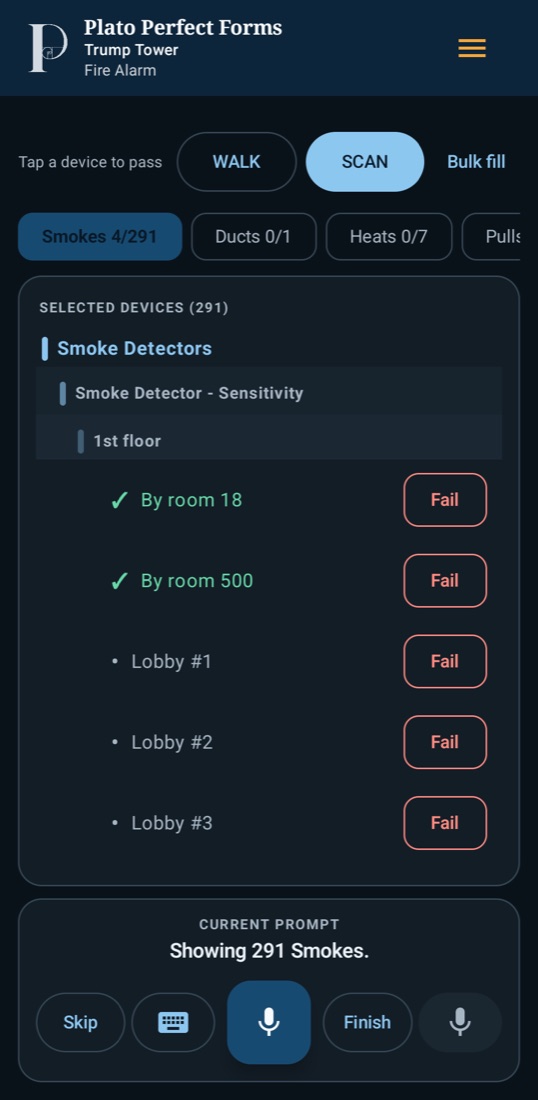
Fire alarm form: smoke detectors on the 1st floor, two passed, each row with a Fail button
Fire Alarm
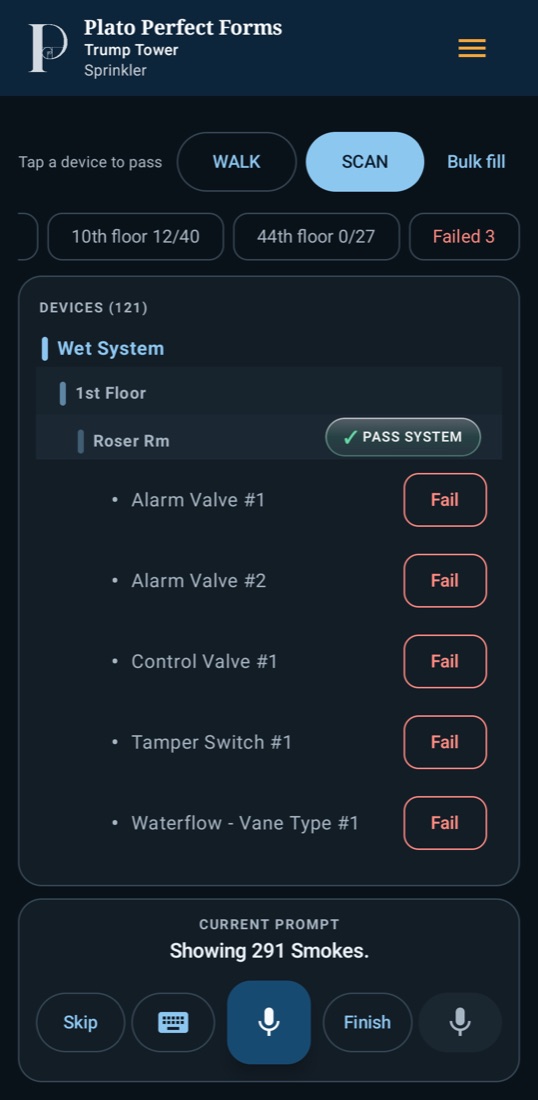
Sprinkler form: wet system devices grouped by floor and room, with a Pass System button
Sprinkler
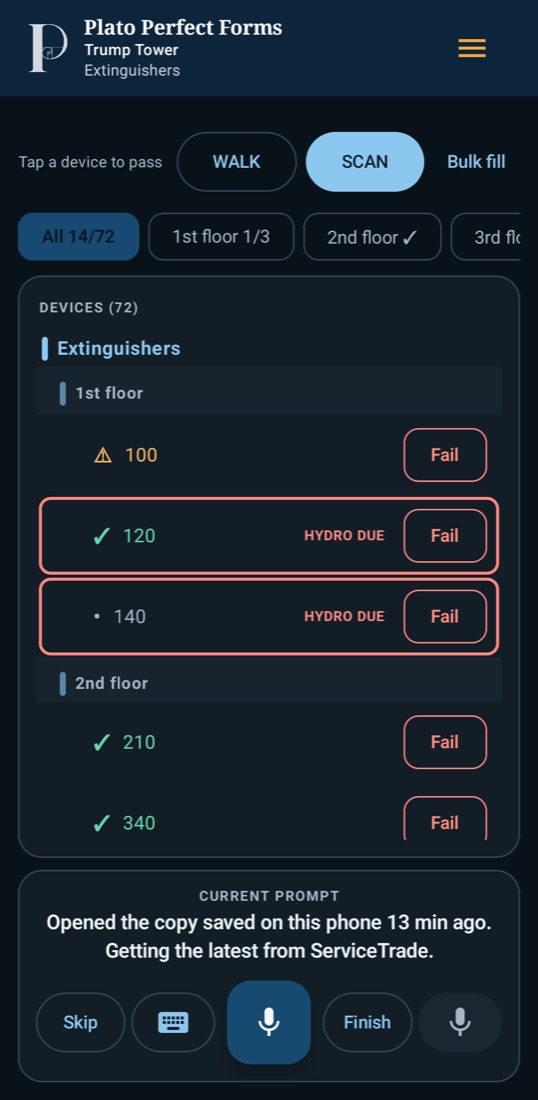
Extinguisher form: units by floor, passed ones checked, hydro due flagged
Extinguishers
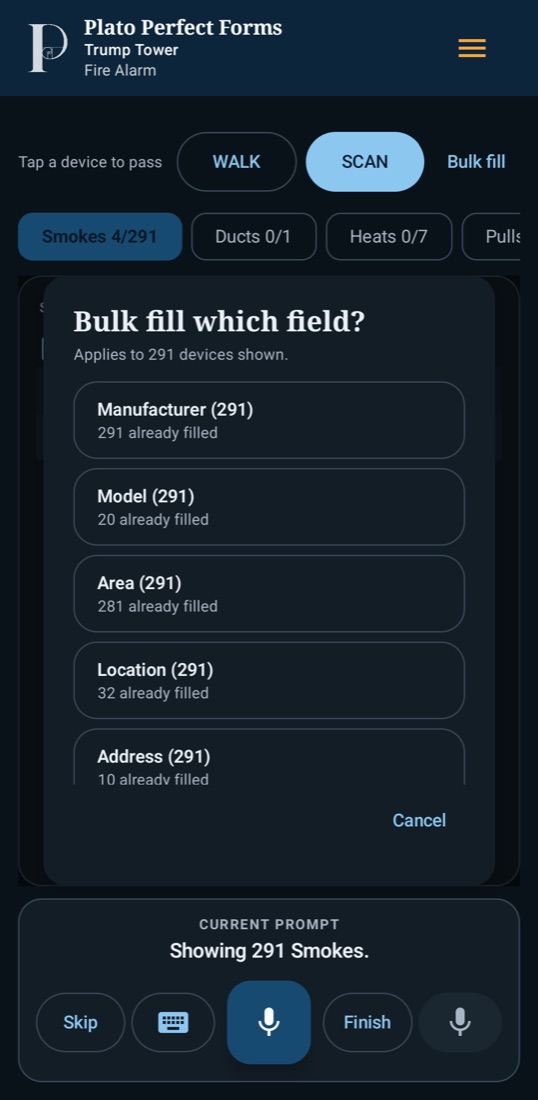
Bulk fill window: pick a field to fill on all 291 smoke detectors shown
Bulk Fill
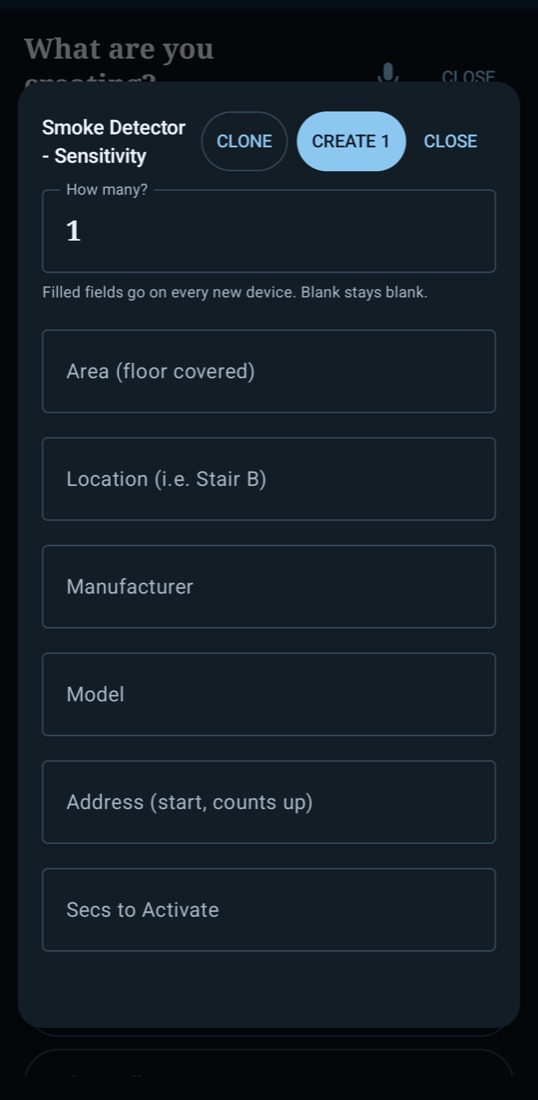
Bulk Create: how many smoke detectors, with shared area, location, manufacturer, model and a counting-up address
Bulk Create
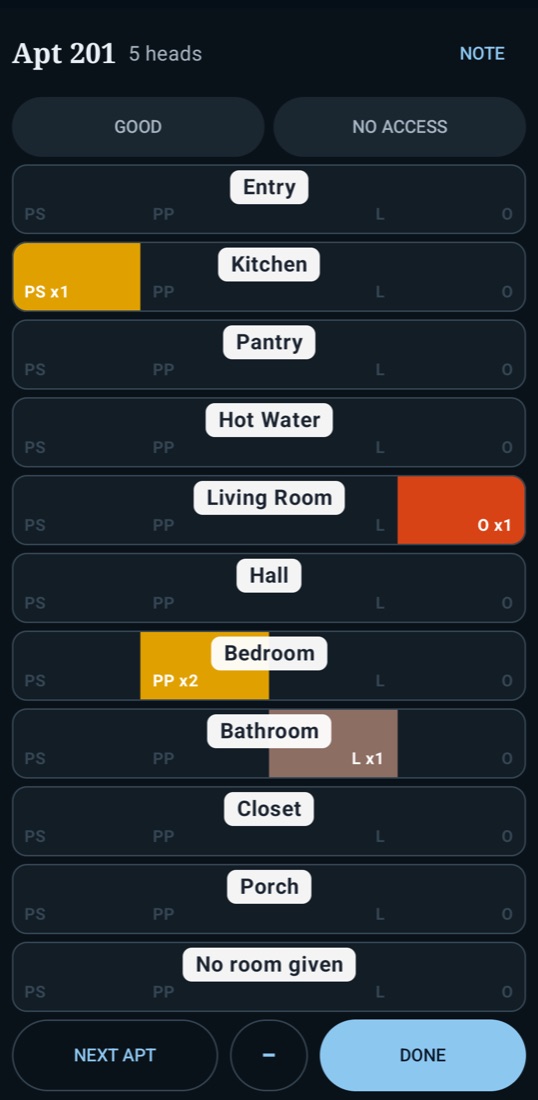
Sprinkler walk-through: apartment 201 with heads marked painted, loaded and obstructed per room
Walk-Through
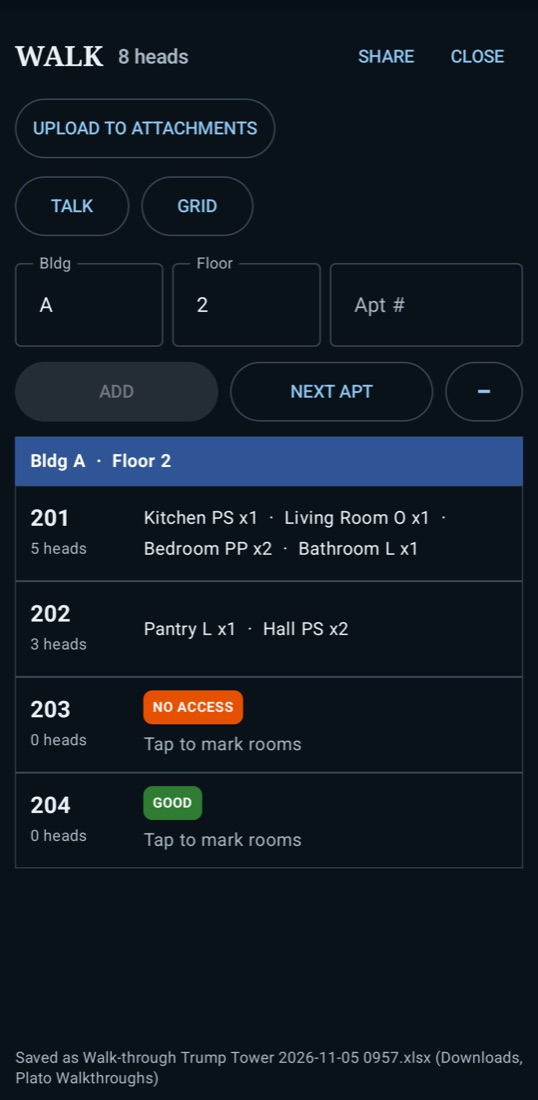
Walk-through list: apartments 201 to 204 with head counts, No access and Good
Walk-Through
Scroll
3
Report Types
1
Tap Passes a System
0
Bars of Signal Needed
2
Android & iPhone

YOU WALK THE BUILDING.
THE FORM KEEPS UP.

01
Just Say It

“Pass all the smokes on this floor.” “Tamper switch, fail.” Plato puts each result on the right device and moves on. Rather tap or type? Both work any time.

02
Powered by ChatGPT

Talk the way you'd talk to a coworker. The Dot, Plato's ChatGPT helper, figures out what you mean and fills the form for you. Turn it off in Settings if you'd rather not.

03
One Tap Passes a System

Devices are laid out by system, floor and area, the way the building is. Floor chips jump you to where you're standing. Everything good? Tap PASS SYSTEM.

04
Deficiencies With Photos

Fail a device and write it up on the spot, pictures included. It goes to ServiceTrade on the right device. Review, edit or remove the job's deficiencies from the menu.

05
No Signal? No Problem.

Basements, risers, parking decks. Keep working: everything is saved on the phone and sends itself when signal comes back. Forms you've opened before open instantly.

06
Auto Mic, Your Call

Turn auto mic on and Plato listens after every question, hands-free. Leave it off on loud sites and the mic opens only when you tap it. Voice works offline too, on phones that support it.

07
Last Visit Carries Over

Last inspection's values come forward, and your license number and signature fill themselves in. You only touch what changed.

08
Nothing Left Behind

Finish review shows what passed, what failed and what's still blank before you pack up. One tap takes you to any blank row.

09
Undo, Even Later

Wrong word? Stray tap? Undo takes back your last change, even after the app was closed. A mistake costs you a second, not a callback.

HUNDREDS OF DEVICES.
MINUTES, NOT HOURS.

Bulk Create
Missing Devices? Build Them in Seconds.

Job showing up empty, or half the riser never got entered? Pick Wet, Dry, Preaction, Deluge or Standpipe, type the area and location once, tap the devices it has, and hit CREATE.

  • Need six? Tap the device six times, or just say “floor 3, six smokes” or “two pulls east stair”
  • Your recent areas and locations are one tap away
  • Plato makes the devices and their ServiceTrade assets and files them under the right system
  • If ServiceTrade turns one down, the rest still go in, and Plato tells you why
Bulk Create window for smoke detectors: how many, area, location, manufacturer, model, starting address
Bulk Fill
Type It Once. Fill It Everywhere.

Same manufacturer on every smoke detector? Same model on every tamper? Tap Bulk fill, pick the field, enter the answer, and every matching device gets it.

  • Fill one device type, one floor, or the whole form
  • See exactly how many devices will change before you save
  • “Only fill blank ones” is on by default, so good answers never get overwritten
  • Only shows fields that are on this form, most-used first
Bulk fill window listing Manufacturer, Model, Area, Location and Address with how many are already filled

EVERY APARTMENT.
ONE CLEAN REPORT.

Checking a building for painted, loaded or obstructed heads? Tap WALK and go door to door, room by room. Plato keeps the count while you walk and has the report ready when you're done.

  • Mark heads painted, loaded or obstructed, sidewall or pendent, with a count for every room
  • Couldn't get in? Mark it No access and it's on the list for the return trip
  • Everything sorted by building and floor, with totals for each
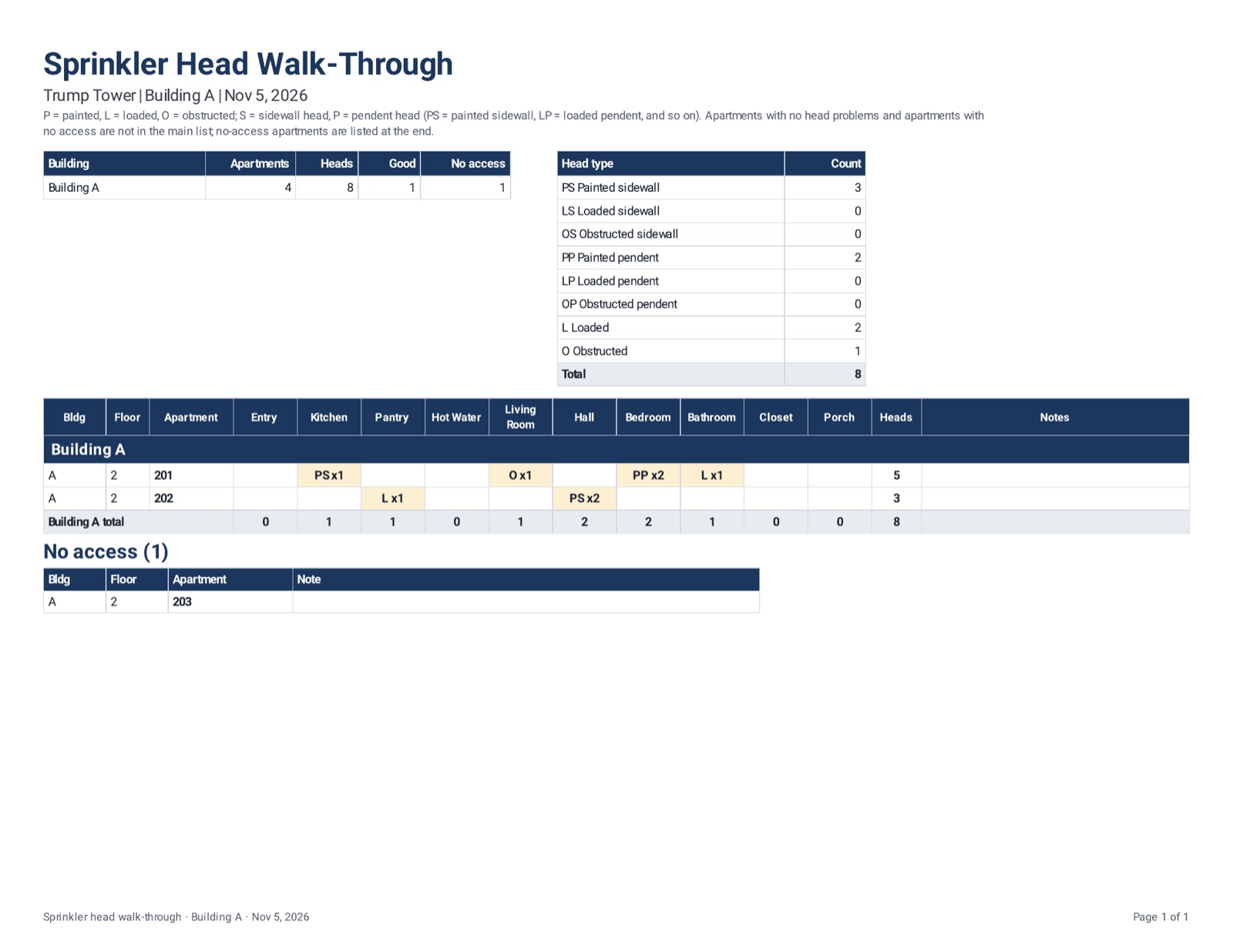
  • Export a spreadsheet and a PDF report: the building summary and head counts up front, then every apartment with a problem, then No access
  • Share both right from the phone to the office or the customer
Also: Head Walk-Through Deficiency

Note the heads that need work as you go, and Plato sends them to ServiceTrade as one deficiency with its photos.

The walk-through PDF report: building summary, head-type counts, a room-by-room table per building with totals, and the No access list
The PDF report, made on the phone
Marking heads room by room in apartment 201 The walk-through list with No access and Good apartments

THREE STEPS.
ZERO PAPERWORK.

01
Sign In, Find the Job

Sign in with your ServiceTrade login. Pick from today's jobs or search by customer, location or job number, then open the form.

02
Inspect Your Way

Talk, tap or type. Pass systems, fail devices with photos, add what's missing and fill readings. Plato saves every answer to the form as you go.

03
You Submit

Check Finish review, then open the report in ServiceTrade and submit it yourself. Plato does the filling; the final call is always yours.

THE REPORTS
YOU RUN EVERY DAY.

Plato fire alarm form on the phone
NFPA 72
Fire Alarm Systems

Annual, semi-annual and quarterly. Smokes, heats, pulls, horn/strobes, panel and batteries, all on one list.

Plato sprinkler form on the phone
NFPA 25
Fire Sprinkler Systems

Annual, semi-annual, quarterly and monthly. Valves, tampers, waterflows and gauges, grouped under each system.

Plato extinguisher form on the phone
NFPA 10
Fire Extinguishers

Annual, semi-annual and monthly. Hand portables and wheeled units, with hydro dates asked once, not every time.

FREE WHILE
WE'RE TESTING

Sign up with the email you use for ServiceTrade. Once you're approved, we send you the Android download link or your iPhone TestFlight invite.

Free Beta
Android Phones & Tablets
$0during the beta
Built on rugged field phones. On a tablet turned sideways, the device list and the job card sit side by side. Plato lets you know when there's a newer version.
Free Beta
iPhone
$0TestFlight beta
The same inspections, sprinkler tools, Bulk Create, offline mode and voice as Android. Sign up and we send your TestFlight invite; updates arrive through TestFlight.

Free beta. Plato Perfect Forms is beta software and may have bugs or issues. Always check your report in ServiceTrade before you submit it. Plato Perfect Forms is an independent app and is not affiliated with or endorsed by ServiceTrade or OpenAI. ChatGPT is a trademark of OpenAI. Use it only where you are authorized to. See the Beta Terms of Use.

ASKED AND
ANSWERED

Does it work with my ServiceTrade account?

Yes. Sign in with your normal ServiceTrade username and password, and Plato works on your real jobs and forms. Use that same email when you sign up for the beta.

Does Plato submit reports for me?

Never. Plato fills and saves the form. You review the finished report in ServiceTrade and submit it yourself.

How does the ChatGPT part work?

Plato's helper, the Dot, uses ChatGPT to understand everyday talk. Say it the way you'd tell a coworker, like “all the smokes on three passed, the pull by the east stair is missing its cover,” and the Dot turns it into results on the right devices.

What if there's no signal?

Keep going. Taps, voice commands, readings and deficiencies are saved on the phone and sent when signal comes back, even if the app was closed. The ChatGPT helper is the one part that needs signal.

Does the mic turn on by itself?

Only if you want it to. Auto mic is a setting: on, Plato listens after every question; off, the mic opens only when you tap it.

Can I add devices that aren't on the job?

Yes. Bulk Create builds a whole system and its devices in one go, and makes their assets in ServiceTrade under the right system.

Is it on Google Play or the App Store?

Not yet. During the beta, Android is a direct download from us and iPhone is through TestFlight. Sign up and we send you the link or the invite.

What does it cost? Does it track me?

It's free during the beta, and we'll tell beta users well before that changes. There are no ads and no analytics or tracking in the app.

Is Plato made by ServiceTrade?

No. Plato Perfect Forms is an independent app from The Gopher Galaxy and is not affiliated with or endorsed by ServiceTrade.

Something isn't working. Who do I call?

Text Tech Support at 469-996-9420 or email platoforms@thegophergalaxy.com.

INSPECTION REPORTS.
RIGHT INTO SERVICETRADE. FAST.

Join the free beta and run your next inspection by voice, on Android or iPhone.

Request Beta Access →
How It Works Get the Free Beta →